
-
Text and copywriting
When creating copy for Digital Signage, consider the “serial position effect.” For example, in a list of several items, viewers remember the last and the first items best. Therefore, place the most important message at the end of the list. Don’t remove text from the screen too quickly — give viewers enough time to read it.

Take advantage of “classification and ordering” principles related to human memory. People remember ordered patterns better — for example, a phone number in the format XXX‑XXX‑XXXX is much easier to remember than a string of 10 digits. Here are some practical tips:
- Strict order: group key phrases or concepts into separate, clearly distinct zones on the screen;
- Repetition: repeat key words, phrases, accents or ideas two or three times in a row;
- Alliteration: use words that start with the same letter or sound.
The screen should always display a call to action. The most effective calls to action are those that can be acted on immediately (for example, “Ask the seller for details,” “Get 15% off,” etc.). A call to action turns passive viewers into people who notice the content and are likely to take action.
-
Visual elements: color, contrast and fonts
There are several basic rules for choosing fonts and arranging text visually:
- Do not use many different fonts. Serif fonts are generally easier to read.
- Don’t write whole words in uppercase letters.
- Avoid line breaks; try to keep the message to one line — this reduces recognition time.
Regarding colors, there are no universal recommendations linking a specific color to content effectiveness. Research shows that choosing one color over another does not significantly change effectiveness. What truly matters is contrast. Any combination of colors that share the same hue, saturation or brightness reduces legibility and therefore decreases content effectiveness.
-
Motion and timing
The most important part of moving images is the silhouette — the outline of the element moving across the screen. The silhouette is the only thing that people can perceive peripherally, so it’s crucial to choose visual elements with clear outlines. If a female silhouette is easily identifiable, the silhouette of a seated child may appear as a blurry blob from a distance. Elements with soft contours are only recognized if the viewer looks directly at them.
Regarding timing — don’t let moving elements interfere with readability or recognition. In most cases you have between 1.5 and 3 seconds to convey a message before the viewer looks away. That is a very short interval, so avoid anything that might confuse the viewer.
Always give viewers enough time to read the text.
For content designers: ensure the text can be read five times within the allotted time.
For everyone else: make sure you can read the text three times before it disappears from the screen.
When creating digital‑menu content, the most important part of the advertisement should be the image of the dish/offer/combo. Whatever is emphasized must be the main element. Moderate motion around or behind that element can improve perception without reducing recognition or comprehensibility.
Do not use a ticker (marquee), especially for important information. Text in a ticker is remembered about 20% worse than static text and requires significantly more time (sometimes many times more) to recognize and process.
The low effectiveness of tickers is a widely accepted fact.
-
Scene composition
In Western cultures the viewer’s eye typically moves across the screen from the upper left to the lower right, as when quickly scanning a newspaper. Consider this when placing visual elements and text on the screen.
Clear, visually separated elements greatly reduce perception time. Think like a film director: divide videos into scenes and shots — for example, split a 15‑second clip into two 7.5‑second scenes or four 3‑second shots. Each scene or shot should function as a separate “poster.” In other words, if playback is paused, the viewer should see information on the screen that makes sense to them.
That is why I believe placing the cash register at the far right is not the best option for effective use of a digital menu board. If you can change the layout and make a “mirror” arrangement (move the cash register to the left side of the counter), the effectiveness of the digital menu board will increase by at least a quarter.
-
Position and placement of digital‑menu screens
At a distance of 5–10 meters from a food‑court counter there is a “decompression zone” or a “space‑talk” area. It is generally not recommended to place Digital Signage screens high above head level — their effectiveness will be too low. Place screens at head level — that is the best viewing plane. Also account for the 20‑degree vertical viewing field that viewers most commonly use while moving through a space. The ideal placement for a digital menu board is at a distance of 2–2.5 m; height — 1.9–2 m from the floor to the monitor’s bottom edge; monitor tilt tangent of 7/2 or ±75 degrees.
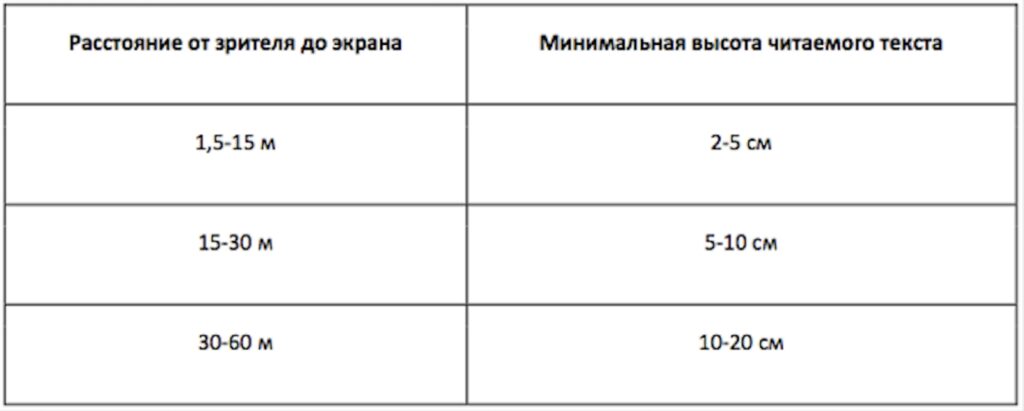
The most important factor for on‑screen text is legibility. The table below provides recommendations for text height depending on the distance between the viewer and the screen.
-
Integrating an advertising campaign
Recall level increases significantly when similar content is broadcast across multiple channels within a restaurant campaign: on Digital Signage screens, in printed materials, on leaflets and banners, through audio messages, etc. Make sure Digital Signage content aligns with other advertising materials and does not mislead viewers/guests.

-
Sound
There are two approaches to using sound in Digital Signage systems: passive (which influences shopper behavior without their conscious awareness) and active (aimed at switching a shopper from their current behavior to a new one). Annoying audio accompaniment shortens guests’ dwell time in a restaurant. However, well‑designed audio, according to research, can increase sales by 5–10%.
Here are some rules to follow when designing audio for Digital Signage content:
-
Do not rely on sound alone without a visual component. It may sound obvious — but it’s a FACT.
-
Use sound to emphasize messages and/or to “switch” attention.
-
Visual messages must always work even without sound.
-
Content format
Among the most common Digital Signage content types are the following:
Images — all image formats, including those with transparent backgrounds and animated image formats.
Video — playback of WMV, MPEG1, MPEG2, DIVX, MPEG4, MOV, as well as streaming, FHD and 4K video.
HTML templates, widgets or digital‑menu templates
WEB — specific regions of a web page can be selected and dynamically displayed on screens.